 BUY WEBSITES
 BUY DOMAINS
 LOGIN
LOGIN
 SIGNUP



Domain expiry check: How to find a domain’s expiration date with WHOIS, RDAP, and EPP status codes
A domain expiry check pulls registration data from 5 sources: registrar account dashboards, public WHOIS lookups, RDAP queries (the ICANN-mandated standard since 28 January 2025), EPP status code interpretation, and continuous monitoring tools.
The authoritative field is the Registry Expiry Date at the registry layer; registrar-side fields lag by hours or days. RFC 9083 defines the RDAP JSON structure: an events array with eventAction="expiration" and eventDate in ISO 8601 format.
The five methods serve different operational needs from one-off checks to portfolio monitoring across 100+ domains.
This guide documents the technical foundations, the 5-method trade-off matrix, and the EPP status code workflow that resolves the common “domain expired but not available” confusion.
What does “domain expiry” mean and what 5 sources reveal the expiration date?
Domain expiry is the registration end date set by the registrar at registration or renewal. Each source that reveals the date serves a different operational need and carries a different level of authority.
Five sources reveal the expiration date:
- The registrar dashboard, for owners with account access.
- A WHOIS lookup, the legacy public protocol.
- An RDAP query, the current ICANN standard.
- EPP status codes, which add lifecycle-phase context.
- Continuous monitoring tools, for portfolio scale.
The expiration date is set at registration and updates at renewal.
The registry records the expiration date the moment a domain is registered. Each renewal extends the date by the renewal term (1 to 10 years).
The date is stored at the registry layer and mirrored to the registrar, which displays it in the customer dashboard. The registry copy is the canonical record documented in Active registration status and what it signals for SEO.
Five sources reveal the date with different authority and access.
The registrar dashboard serves owners with account access. A WHOIS or RDAP lookup serves anyone checking any domain.
EPP status codes reveal the lifecycle phase context that a bare date field omits. Monitoring tools track the date continuously across a portfolio.
The 5-method trade-off matrix in section 7 maps each method to its operational fit.
Domain expiry differs from “available for re-registration.”
An expired domain is not immediately available. The lifecycle adds three windows before the registry purges the name:
- A 30-45 day registrar grace period.
- A 30-day Redemption Grace Period.
- A 5-day pending-delete window.
The full sequence runs approximately 75-80 days for a .com, documented in Expired vs deleted vs dropped: domain lifecycle disambiguation across 5 RFC 3915 states.
How does a WHOIS lookup return the expiration date?
A WHOIS lookup queries the registry’s public database via the legacy protocol defined in RFC 3912 (September 2004). The Registry Expiry Date field returns in ISO 8601 format (for example “2026-12-15T04:00:00Z”).
ICANN sunsetted the WHOIS requirement for gTLDs on 28 January 2025; RDAP is the current standard, though WHOIS interfaces remain widely available.
# whois example.com (abbreviated output)
Domain Name: EXAMPLE.COM
Registry Domain ID: 2336799_DOMAIN_COM-VRSN
Registrar WHOIS Server: whois.iana.org
Updated Date: 2025-08-14T07:01:34Z
Creation Date: 1995-08-14T04:00:00Z
Registry Expiry Date: 2026-08-13T04:00:00Z   ← canonical
Registrar: RESERVED-Internet Assigned Numbers Authority
Domain Status: clientDeleteProhibited
Domain Status: clientTransferProhibited
Name Server: A.IANA-SERVERS.NET
DNSSEC: signedDelegation
WHOIS web tools return the same data through different interfaces.
Three public tools query the same registry data and present it in different layouts:
- Whois.com, a third-party lookup interface.
- ICANN Lookup (lookup.icann.org), the official tool, which queries RDAP behind the interface.
- WhatsMyDNS, a multi-record lookup service.
The expiration field appears under “Registry Expiry Date” or an equivalent label across these tools.
The whois command-line tool queries the registry directly.
The whois command on Linux and macOS returns space-delimited output filterable with standard text tools. The command whois example.com | grep 'Expir' isolates the expiration lines.
The technique scales to scripts documented in section 6.
WHOIS privacy masks registrant data but not the expiry date.
Privacy services replace the registrant name, address, and email with proxy values. The expiration date stays publicly visible per ICANN policy because the date is operational registry data, not personal information.
A privacy-protected domain still returns its Registry Expiry Date in any lookup.
WHOIS field names vary across TLDs.
Different registries label the expiration field differently:
- “Registry Expiry Date” for gTLDs.
- “paid-till” for .ru.
- “expire-data” for .it.
- “Renewal date” for .uk.
A case-insensitive filter such as grep -i 'expir' captures the common variations. ccTLD-specific labels require per-registry handling.
How does RDAP return the expiration date and what makes it the current ICANN-mandated standard?
RDAP (Registration Data Access Protocol, RFC 9082 and RFC 9083) returns the expiration date as an event in a structured JSON response.
ICANN mandated RDAP for gTLD registries and accredited registrars on 26 August 2019. The WHOIS requirement sunsetted on 28 January 2025.
RDAP delivers three advantages over the legacy protocol:
- HTTPS transport instead of clear-text port 43.
- Machine-readable JSON instead of free text.
- IANA-discovered endpoints instead of hardcoded servers.
// GET https://rdap.verisign.com/com/v1/domain/example.com
{
  "objectClassName": "domain",
  "ldhName": "EXAMPLE.COM",
  "events": [
    { "eventAction": "registration",  "eventDate": "1995-08-14T04:00:00Z" },
    { "eventAction": "last changed",  "eventDate": "2025-08-14T07:01:34Z" },
    { "eventAction": "expiration", "eventDate": "2026-08-13T04:00:00Z" }
  ],
  "status": [ "client delete prohibited", "client transfer prohibited" ]
}
Events can be future dated. One use case for future dating of events is to denote when an object expires from a registry.
RFC 9083 · JSON Responses for the Registration Data Access Protocol (RDAP) · A. Newton, S. Hollenbeck
The IANA bootstrap registry maps each TLD to its RDAP server.
The IANA registry at data.iana.org/rdap/dns.json maps every TLD to its authoritative RDAP server. A query first reads the bootstrap file to discover the correct endpoint, then queries that server. The bootstrap mechanism removes the need to hardcode endpoints per TLD.
The Verisign endpoint follows a predictable URL pattern.
The Verisign RDAP endpoint for .com and .net queries follows the pattern https://rdap.verisign.com/com/v1/domain/<name>. A direct GET request to that URL returns the full JSON object including the events array.
Other registries publish their endpoints in the IANA bootstrap file.
A single command extracts the expiration date from the JSON.
The events array isolates the expiration date through a one-line filter combining curl and jq. The pattern selects the event where eventAction equals “expiration” and prints its eventDate. The command is documented in the automation section below.
AFNIC documents that gTLDs mandate RDAP while ccTLDs deploy it optionally.
The .fr registry operator AFNIC documents that ICANN-contracted gTLD registries are obliged to deploy RDAP. Country-code TLDs deploy it at their discretion. AFNIC notes that .fr was an early ccTLD adopter.
Operators checking ccTLD expiry confirm RDAP availability per registry before relying on it.
What 6 EPP status codes signal about a domain’s current expiry phase?
Six EPP status codes signal the domain’s expiry phase, from ok on an active registration through pendingDelete in the final window. The table below maps each code to its lifecycle phase, recoverability, and buyer signal.
The code prefix indicates the source. A client code is registrar-set. A server code is registry-set.
| EPP status code | Lifecycle phase | Recoverable? | What it signals to a buyer |
|---|---|---|---|
ok | Active registration | n/a (active) | Domain is live and held; not available |
autoRenewPeriod | Registrar grace (30-45 days) | Yes, at standard renewal | Expired recently; owner can still renew cheaply |
redemptionPeriod | RGP at registry (30 days) | Yes, at $80-$200 fee | Owner can still recover; not yet available |
pendingDelete | Final window (5 days) | No | Purge imminent; drop-catching territory |
clientHold | Registrar-suspended | Yes (resolve hold) | DNS off, often overdue payment; still owned |
pendingRestore | RGP restore in progress | Restore underway | Owner is actively recovering the domain |
The ok status indicates a normally active domain.
The ok status (also shown as “active”) indicates no pending operations and no restrictions beyond standard locks. A domain with ok status is held by its current registrant and is not available.
The expiration date in this state reflects the active registration term.
The autoRenewPeriod status follows the registrar grace window.
The autoRenewPeriod status applies during the 30-45 day registrar grace following automatic renewal at expiry. The registrant renews at standard cost during this window.
The mechanics of this phase are documented in Grace period and auto-renew grace.
The redemptionPeriod status signals a recoverable expired domain.
The redemptionPeriod status (RFC 3915) indicates the registrar issued a delete command and the registry opened the 30-day Redemption Grace Period. The registrant restores the domain at an $80-$200 fee plus renewal.
The phase is documented in Redemption period (RGP) explained.
The pendingDelete status marks the final 5-day window.
The pendingDelete status is the 5-day final window before the registry purges the domain. No restoration is available during this window. The mechanics are documented in Domain pending-delete phase: Duration and mechanics.
Why does Registry Expiry Date take authority over Registrar Expiry Date and dashboard display?
The authority hierarchy runs Registry Expiry Date, then Registrar Expiry Date, then registrar dashboard. The registry holds the canonical date.
Registrar-side fields lag by hours or days due to internal caching and sync timing. The dashboard reflects the registrar’s view, which diverges from the registry record during transfer or renewal processing.
Tier 1 · Registry Expiry Date
Set by the gTLD registry (Verisign for .com/.net, PIR for .org, Identity Digital for new gTLDs). This is the date the registry enforces for grace, redemption, and deletion. Returned by RDAP and registry-side WHOIS.
Tier 2 · Registrar Expiry Date
What the registrar’s internal systems record. Usually matches the registry, but sync lag during renewal or transfer windows produces temporary divergence. Returned by registrar-side WHOIS.
Tier 3 · Registrar dashboard
The date shown in the account interface. Reflects the registrar’s view and updates on the registrar’s own schedule. Convenient for owners but not authoritative during processing windows.
| TLD | Field label | Registry |
|---|---|---|
| .com / .net | Registry Expiry Date | Verisign |
| .org | Registry Expiry Date | PIR |
| .uk | Renewal date | Nominet |
| .ru | paid-till | TCI |
| .it | expire-data | Registro.it |
| .fr | Expiry Date | AFNIC |
The Registry Expiry Date is the canonical record.
The gTLD registry sets and enforces the expiration date. Each gTLD maps to a specific registry operator:
- Verisign for .com and .net.
- PIR for .org.
- Identity Digital for many new gTLDs.
The grace, redemption, and deletion windows all count from the registry date, not the registrar copy.
The Registrar Expiry Date can lag the registry by up to 72 hours.
The registrar’s internal systems mirror the registry date but update on the registrar’s own sync schedule. During renewal processing or transfer windows, the registrar copy diverges from the registry copy for 0 to 72 hours.
The divergence resolves once the registrar completes its sync.
Registries auto-push expiration dates assuming renewal.
A documented case on the NamePros forum illustrates the divergence. A domain showed a 2027 expiration in external WHOIS while the actual registrar expiration was 2026.
Registries auto-extend the displayed date one year forward at expiry on the assumption of renewal. The displayed date corrects when the registrar declines to renew and returns the domain toward deletion around day 45.
The “domain expired but not available” pattern has a single cause.
A domain reads “expired” yet returns “not available” when it sits in autoRenewPeriod, redemptionPeriod, or pendingDelete at the registry. The registration lapsed, but the registry has not purged the name.
The registrant retains recovery rights through the redemption window. The domain becomes registerable only after the pending-delete window elapses and the registry purges the record.
How do command-line and automation workflows scale expiry checking across portfolios?
Command-line workflows scale expiry checking from a single lookup to a scheduled portfolio alert. The code block below shows four patterns in order, from WHOIS extraction to a daily cron alert.
Each pattern composes standard tools: whois with grep and awk, curl with jq, a bash for-loop, and a cron entry. Open-source scripts implement production-grade versions with email thresholds.
# 1. WHOIS extraction for a single domain
whois example.com | grep -i 'Expir'

# 2. RDAP query with jq, isolating the expiration event
curl -s https://rdap.verisign.com/com/v1/domain/example.com \
  | jq '.events[] | select(.eventAction=="expiration") | .eventDate'

# 3. Bash for-loop across a portfolio file
for d in $(cat domains.txt); do
  echo -n "$d "; whois $d | grep -i 'Expir' | head -n 1
done

# 4. Daily cron alert at a 30-day threshold
@daily /usr/local/bin/domain-check.sh -f portfolio.txt -e [email protected] -x 30
The whois command extracts the expiry line with grep and awk.
The command whois example.com | grep -i 'Expir' isolates the expiration lines from the full WHOIS response. Adding awk '{print $NF}' prints the date value alone.
Case-insensitive matching handles the TLD field-name variations documented in section 5.
A bash for-loop iterates a portfolio file.
A for-loop reads a newline-delimited domain list and runs the check on each entry. The loop pairs the domain name with its expiration line in a single pass.
The pattern scales from a handful of domains to a full portfolio file without manual repetition.
The curl and jq pattern parses the RDAP JSON.
The curl command fetches the RDAP JSON and pipes it to jq, which selects the expiration event and prints its date. The pattern handles the structured response cleanly because RDAP returns predictable JSON instead of free text.
This is the automation advantage RDAP holds over WHOIS.
A cron entry sends scheduled threshold alerts.
The open-source domain-check-2 shell script implements a -d single-domain and -f file mode plus -e email and -x day-threshold flags.
A @daily cron entry running the script with a 30-day threshold sends an alert 30 days before any portfolio domain expires.
The cadence aligns with the 30/14/7/1-day alert pattern documented in Domain lifecycle tracking: WHOIS, RDAP, and the workflow tools that monitor every status code.
What 5 method types serve different operational needs (one-off vs portfolio)?
Five method types serve different operational needs, from a one-off owner check to portfolio-scale monitoring. The matrix below maps each method to its best use, technical level, volume scale, and output authority.
The trade-offs span three axes: account access, technical level, and volume.
| Method | Best for | Technical level | Volume scale | Output authority |
|---|---|---|---|---|
| Registrar dashboard | Domains you own | None | 1 to portfolio | Tier 3 (lags) |
| WHOIS lookup | Any domain, casual | Low | 1 at a time | Tier 1-2 |
| RDAP query | Accuracy + automation | Medium | 1 to scripted | Tier 1 (canonical) |
| EPP status reading | Lifecycle phase context | Medium | 1 at a time | Tier 1 (registry-set) |
| Monitoring tool | Portfolio at scale | Low setup | 10 to 1000+ | Tier 1-2 |
The registrar dashboard is fastest for owned domains.
The dashboard requires account access and serves owners checking their own domains. It needs no technical skill and shows the registrar’s recorded date. The trade-off is Tier 3 authority: the dashboard date lags the registry during processing windows.
WHOIS lookup serves casual any-domain checks.
A WHOIS lookup checks any domain without account access and needs minimal technical skill. It serves one-off research well. The protocol is deprecated after the ICANN January 2025 sunset, though WHOIS interfaces continue to operate by querying RDAP underneath.
RDAP query delivers canonical accuracy and automation.
An RDAP query returns Tier 1 canonical data in structured JSON. It suits both accurate single checks and scripted automation.
The IANA bootstrap discovery and predictable JSON make RDAP the foundation for any programmatic expiry-checking workflow.
EPP status reading adds the lifecycle phase context.
Reading the EPP status codes reveals whether an expired domain sits in grace, redemption, or pending delete. This context distinguishes a recoverable domain from an available one. The phase context is what a bare expiration date omits.
Monitoring tools scale to portfolios with alert cadences.
Monitoring services track expiration continuously across a portfolio and fire alerts on a 30/14/7/1-day cadence. They integrate with email and team channels and suit operators managing 10 to 1000+ domains.
The build-versus-buy decision for monitoring is documented in the lifecycle tracking sibling guide.
What questions do owners and researchers ask about checking domain expiry?
Owners and researchers ask six recurring questions about checking domain expiry. They span WHOIS versus RDAP accuracy, the “expired but not available” pattern, free lookup options, pendingDelete meaning, portfolio monitoring, and re-registration timing.
The terminology overlap drives the confusion in this cluster. The cards below answer each question in turn.
Q1Why is a domain expired but not available for me to register?
The domain lapsed at the registrar but sits in autoRenewPeriod, redemptionPeriod, or pendingDelete at the registry. The registry has not purged the name, so the original registrant retains recovery rights.
The domain becomes registerable only after the 5-day pending-delete window elapses, approximately 75-80 days after expiry for a .com.
Q2What is the difference between WHOIS and RDAP for expiry checks?
WHOIS (RFC 3912) returns free text; RDAP (RFC 9082 and RFC 9083) returns structured JSON. RDAP is the ICANN-mandated standard since the 28 January 2025 WHOIS sunset.
RDAP adds HTTPS transport, IANA-discovered endpoints, and a predictable events array, which makes it the better choice for accurate and automated checks.
Q3How do I check a domain’s expiration date for free?
The free options are the official ICANN Lookup tool (lookup.icann.org), a public WHOIS service, a direct RDAP query through the registry endpoint, or the registrar dashboard for an owned domain.
All return the expiration date at no cost. ICANN Lookup queries RDAP behind its interface.
Q4Can I check expiration without owning the domain?
Yes. WHOIS, RDAP, and ICANN Lookup return the expiration date for any registered domain regardless of ownership. The expiration date is public operational data.
WHOIS privacy services mask the registrant identity but leave the expiration date visible.
Q5What does pendingDelete status mean on a domain?
The pendingDelete status is the 5-day final window before the registry purges the domain. No restoration is available during this window.
After it elapses, the registry releases the name for public re-registration. A pendingDelete status signals an imminent drop.
Q6How do I monitor multiple domains for expiry at scale?
Monitoring tools track a portfolio continuously and alert on a 30/14/7/1-day cadence. A scripted alternative runs a daily cron job over a domain list with an email threshold flag.
Both approaches scale from 10 to 1000+ domains without manual checking.
How does SEO Domains apply lifecycle expertise across 220,000+ aged-domain inventory?
SEO Domains applies the lifecycle expertise documented in this guide across 220,000+ aged-domain inventory, acquired through ICANN-accredited drop-catching at registry release.
Each catalogue listing carries documented registration history, expiry tracking, and EPP status validation through the WHOIS, RDAP, and EPP methods documented above.
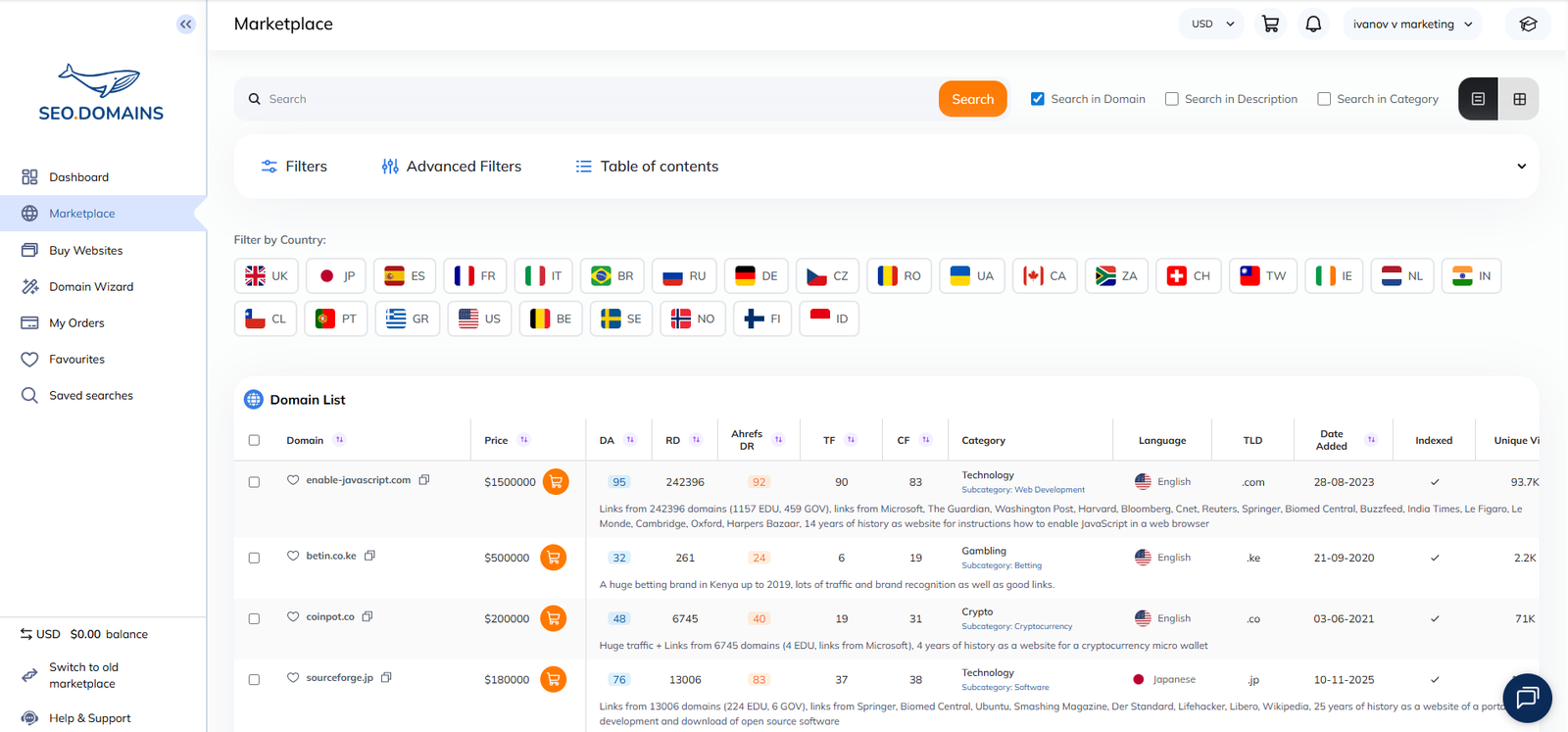
The catalogue is curated through WHOIS, RDAP, and EPP signal triangulation.
The same WHOIS, RDAP, and EPP status reading documented in sections 2 through 4 underpins the catalogue curation.
Each listing is validated against registry-layer data, so the recorded lifecycle history reflects canonical Tier 1 sources instead of registrar-side copies.
Registration history records preserve historical expiry data.
An automated WHOIS or RDAP query returns only the current expiration date. The catalogue preserves the historical registration record per domain, which supports buyer due diligence into a domain’s continuous-history profile beyond the single current date.
The catalogue surfaces lifecycle history that live queries omit.
A live expiry check confirms the present state. Buyer due diligence requires the prior history: registration continuity, ownership-change records, and lifecycle events. The catalogue records this history to support evaluation that a one-off lookup cannot provide.
Aged-domain SEO value depends on documented registration continuity.
The SEO Domains analytical desk treats a continuously held name as the carrier of accumulated authority, and a freshly re-registered expired name without documented history as a separate entity.
A redirect strategy that preserves prior authority depends on that continuity being verifiable through the registration record, not assumed from a single current expiry date. The catalogue’s documented history supplies the continuity evidence that the strategy depends on.
Explore the lifecycle expertise applied in practice in the SEO Domains marketplace.
